Build a Telegram Bot That Reports to You
Send alerts, files and error tracebacks from Python to your phone with a Telegram bot. Includes a reusable notifier module and security tips.
You have a script that runs at night, a scraper that checks prices or a backup job on a server. How do you know that it worked? Reading log files every morning is boring, and email alerts get lost among newsletters. A Telegram bot solves this in a few minutes: your script sends a short message to your phone when it finishes, when something fails or when a number crosses a limit. It is free, it needs no server of its own, it has no approval process and the Bot API is a plain HTTPS interface that you can call with the requests library.
This is the third part of our Python automation series. You will create a bot, find your chat id, send formatted messages and files, split long messages, report errors with a full traceback, handle rate limits and build a small reusable module that you can drop into any script. We also cover the security rules that most tutorials skip, so that nobody else can use your bot.
How the Telegram Bot API works
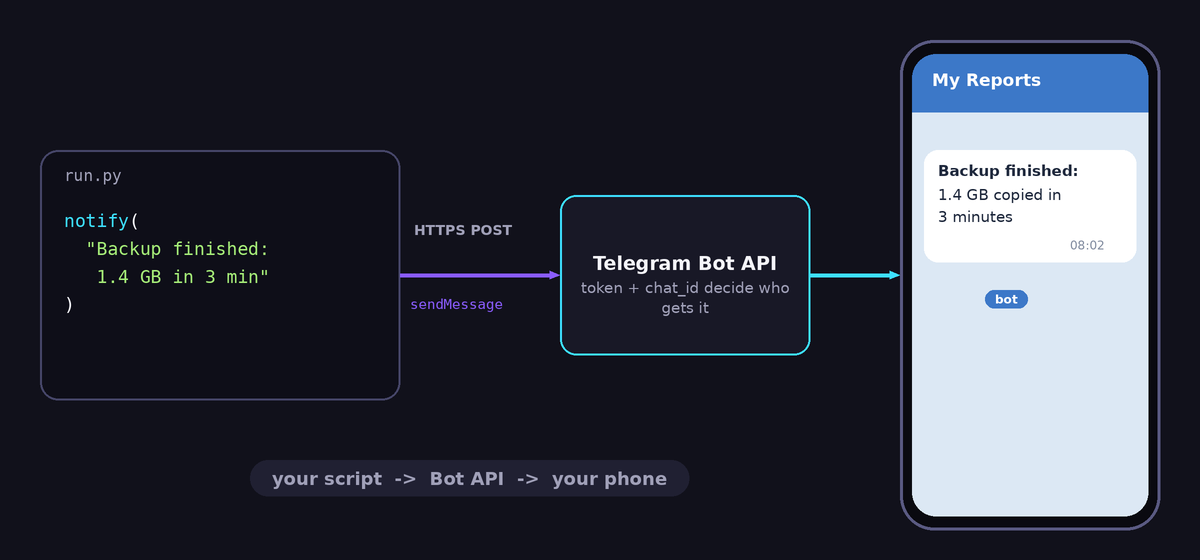
A bot is a special Telegram account that is controlled by a program. When your program wants the bot to do something, it sends an HTTPS request to the address https://api.telegram.org/bot<TOKEN>/<METHOD>. The token is a long secret string that proves you own the bot. The method names the action, such as sendMessage, sendDocument or getMe. Telegram answers with JSON that contains "ok": true and a result, or "ok": false and a description of the problem.
For reports you only need to send, so you do not need a webhook or a polling loop. That is why this setup is so small and so reliable.
Step 1: Create the bot with BotFather
- Open Telegram and search for @BotFather. Make sure it has the blue verified badge, because fake copies exist.
- Send
/newbot. - Choose a display name, for example "My Reports".
- Choose a username that ends with
bot, such asmy_reports_demo_bot. It must be unique. - BotFather replies with the token, which looks like
123456789:AAH.... Copy it.
Treat the token like a password. Anyone who has it can send messages as your bot and read messages sent to it. If it leaks, open BotFather, choose /mybots, pick your bot, then API Token and revoke it to get a new one. Never paste the token into a public GitHub repository, a screenshot or a forum post.
Step 2: Find your chat id
The bot needs to know where to send messages. Every chat, person or group has a numeric id. A bot cannot start a conversation with you, so first open your bot in Telegram, press Start and send any message, for example "hello". Then ask the API for the latest updates:
import requests

TOKEN = "123456789:AAH-your-token"
r = requests.get(
    f"https://api.telegram.org/bot{TOKEN}/getUpdates",
    timeout=15,
)
print(r.json())
In the answer, look for result[0].message.chat.id. For a private chat this is a positive number such as 987654321. For groups it is a negative number. That is your chat id. If result is an empty list, you did not send a message to the bot yet. If you get a 409 error instead, another program is polling with the same token or a webhook is set, which this article about the Telegram 409 error explains.
Store both values as environment variables, not in the code. On Linux and macOS:
export BOT_TOKEN="123456789:AAH-your-token"
export CHAT_ID="987654321"
Step 3: Send your first message
import os
import requests

def notify(text):
    token = os.environ["BOT_TOKEN"]
    chat_id = os.environ["CHAT_ID"]
    r = requests.post(
        f"https://api.telegram.org/bot{token}/sendMessage",
        json={"chat_id": chat_id, "text": text},
        timeout=10,
    )
    r.raise_for_status()
    return r.json()

notify("Backup finished: 1.4 GB copied in 3 minutes")
Your phone buzzes within a second. Two habits are already built in: the request has a timeout, so a network problem cannot freeze the script, and raise_for_status() raises an error when Telegram answers with a failure, such as a wrong token or chat id. If you want to understand more about these habits, read our guide to timeouts and retries in requests.
Step 4: Format messages
Plain text is fine, but formatting makes reports scannable. Telegram supports HTML and Markdown styles through the parse_mode field. HTML is easier to get right. The allowed tags include <b>, <i>, <code>, <pre> and <a href="...">:
import html

def notify_html(text):
    token = os.environ["BOT_TOKEN"]
    r = requests.post(
        f"https://api.telegram.org/bot{token}/sendMessage",
        json={
            "chat_id": os.environ["CHAT_ID"],
            "text": text,
            "parse_mode": "HTML",
            "disable_web_page_preview": True,
        },
        timeout=10,
    )
    r.raise_for_status()

name = "Price checker"
detail = "Price < 500 & stock > 0"      # contains < and & characters

notify_html(f"<b>{html.escape(name)}</b>\n<code>{html.escape(detail)}</code>")
The html.escape calls are essential. Telegram reads the characters <, > and & as markup, so an unescaped value from outside, such as a product title or an error message, can make the request fail with "can't parse entities". Escape every piece of variable text that you put inside HTML. Setting disable_web_page_preview stops Telegram from adding large link previews to your report.
Step 5: Long messages and files
A single message can hold at most 4096 characters. A long report or a traceback exceeds that, and Telegram rejects it. Split the text into chunks:
def chunks(text, size=4000):
    for i in range(0, len(text), size):
        yield text[i:i + size]

def notify_long(text):
    for part in chunks(text):
        notify(part)
For really long output, send a file instead. The sendDocument method uploads any file, such as a log or a CSV, with an optional caption:
def send_file(path, caption=""):
    token = os.environ["BOT_TOKEN"]
    with open(path, "rb") as f:
        r = requests.post(
            f"https://api.telegram.org/bot{token}/sendDocument",
            data={"chat_id": os.environ["CHAT_ID"], "caption": caption[:1000]},
            files={"document": f},
            timeout=60,
        )
    r.raise_for_status()

send_file("report.csv", "Daily report")
The upload timeout is longer because files take more time to transfer. Bots have a size limit for uploads, which Telegram documents as 50 MB at the time of writing, so check the Bot API documentation if you plan to send large files. If you generate CSV files for people to open in Excel, write them with utf-8-sig, as explained in this CSV encoding guide.
Step 6: Report errors automatically
The most valuable use of the bot is to hear about failures. Wrap your main function so that any exception is sent to your phone with its traceback. A decorator makes this reusable:
import functools
import html
import traceback

def report_errors(func):
    @functools.wraps(func)
    def wrapper(*args, **kwargs):
        try:
            return func(*args, **kwargs)
        except Exception:
            tb = traceback.format_exc()
            msg = f"<b>{html.escape(func.__name__)} failed</b>\n<pre>{html.escape(tb[-3500:])}</pre>"
            try:
                notify_html(msg)
            except Exception:
                pass            # never let the alert hide the real error
            raise
    return wrapper

@report_errors
def nightly_job():
    rows = 120
    # ... do real work, maybe raise an exception ...
    notify(f"Nightly job OK: {rows} rows processed")

nightly_job()
Study the details. Only the last 3500 characters of the traceback are sent, because the useful part is at the end and the message must stay under the limit after escaping. The inner try/except ensures that a failing alert does not hide the original exception, and raise at the end re-raises the original error so that your scheduler still sees a failed run. This pattern fits perfectly with jobs that run on a timer, as covered in the cron and Render scheduling guide.
Step 7: Respect rate limits
Telegram protects its servers. The documentation advises avoiding more than about one message per second in a single chat, and limits bulk sending to roughly thirty messages per second overall. A report script rarely comes near that. But a loop that sends one message per row of a large table can. If Telegram replies with status 429 Too Many Requests, the JSON contains parameters.retry_after, the number of seconds to wait. Handle it politely:
import time

def send_safe(text, tries=3):
    token = os.environ["BOT_TOKEN"]
    for _ in range(tries):
        r = requests.post(
            f"https://api.telegram.org/bot{token}/sendMessage",
            json={"chat_id": os.environ["CHAT_ID"], "text": text},
            timeout=10,
        )
        if r.status_code == 429:
            wait = r.json().get("parameters", {}).get("retry_after", 5)
            time.sleep(wait + 1)
            continue
        r.raise_for_status()
        return r.json()
    raise RuntimeError("Telegram rate limit: gave up")
The better solution for large tables is to summarise: one message that says "37 new items, 3 price drops" with the top five lines, instead of 37 separate messages. Your phone will thank you.
A reusable module
Put the pieces in one file, tg.py, and import it everywhere. It reads the settings from environment variables, escapes text, splits long messages and never crashes the calling script when Telegram is unreachable:
# tg.py
import html
import os
import requests

API = "https://api.telegram.org/bot{token}/{method}"

def _call(method, **kwargs):
    token = os.environ.get("BOT_TOKEN")
    chat_id = os.environ.get("CHAT_ID")
    if not token or not chat_id:
        print("tg: BOT_TOKEN or CHAT_ID missing, message not sent")
        return False
    try:
        r = requests.post(
            API.format(token=token, method=method),
            timeout=15,
            **kwargs,
        )
        return r.ok
    except requests.RequestException as e:
        print("tg: could not reach Telegram:", e)
        return False

def send(text, html_mode=False):
    ok = True
    for i in range(0, len(text), 4000):
        payload = {"chat_id": os.environ.get("CHAT_ID"), "text": text[i:i + 4000]}
        if html_mode:
            payload["parse_mode"] = "HTML"
        ok = _call("sendMessage", json=payload) and ok
    return ok

def esc(value):
    return html.escape(str(value))
Use it in any script:
import tg

tg.send(f"<b>Backup done</b>\nFiles: {tg.esc(1423)}", html_mode=True)
A notification helper should be quiet when it fails. If Telegram is down, your real job should still finish. It should print the problem and carry on.
Security rules for a reporting bot
- Keep the token in environment variables or a secrets manager, never in the code or the repository. Add
.envto.gitignore. - Send only to your own chat id. A reporting bot does not need to answer anyone.
- If you also read messages, accept commands only from your chat id and ignore everything else. Otherwise strangers who find your bot username can control it.
- Never send secrets in reports. Do not put passwords, tokens or customer data in messages. Telegram bot chats are not end-to-end encrypted in the way secret chats are.
- Revoke and replace the token immediately if you suspect a leak.
- Rotate access when people leave. If a colleague had the token, revoke it.
Ideas for useful reports
- A nightly job summary: how many rows, how many errors, how long it took.
- A price or stock alert from a scraper built with BeautifulSoup.
- A disk space or memory warning for your server.
- A heartbeat message every morning, so that silence tells you the schedule broke.
- A message when a long download or training run finishes.
- A weekly summary with a CSV attached.
Troubleshooting
- 401 Unauthorized: the token is wrong or was revoked. Copy it again from BotFather.
- 400 Bad Request: chat not found: the chat id is wrong, or you never pressed Start on the bot. A user must write to the bot first.
- 403 Forbidden: bot was blocked by the user: you blocked or stopped the bot in Telegram. Unblock it.
- 400 can't parse entities: you used HTML or Markdown with unescaped special characters. Escape the text or send plain text.
- No message and no error: check that your script really reaches the notify call, and that your network or server allows outgoing HTTPS requests to
api.telegram.org. - 409 Conflict on getUpdates: another process or a webhook uses the token. See the dedicated article linked above.
Frequently asked questions
Is the Telegram Bot API free?
Yes. Creating bots and sending messages is free. There are rate limits, but ordinary reporting stays far below them.
Can the bot send messages to a group or a channel?
Yes. Add the bot to the group, or make it an administrator of the channel, and use that chat's id. Group ids are negative numbers, and channels often start with -100. You can find the id by sending a message in the group and calling getUpdates.
Do I need a library such as python-telegram-bot?
Not for sending reports. Plain requests is enough and has no extra dependencies. A library is useful when your bot must react to commands, show buttons and keep conversations.
Can I get replies from the bot, for example to start a job?
Yes, but then you need either polling or a webhook, and you must restrict commands to your own chat id. Start with one-way reports, and add commands only when you need them.
Will I get charged or blocked for many messages?
Normal reports are fine. Stay under the rate limits, avoid spamming, and summarise instead of sending hundreds of single messages.
Final thoughts
A Telegram bot turns a silent script into one that talks to you. With one token, one chat id and a ten-line helper, you hear about successes and failures within seconds, wherever you are. Keep the token secret, escape your text, send summaries instead of floods and let the notifier fail quietly. Add it to the end of your next scheduled script and you will wonder how you ever lived without it.