C++ Pointers Explained Simply
Understand C++ pointers with simple examples: addresses, dereferencing, nullptr, const, new and delete, and smart pointers.
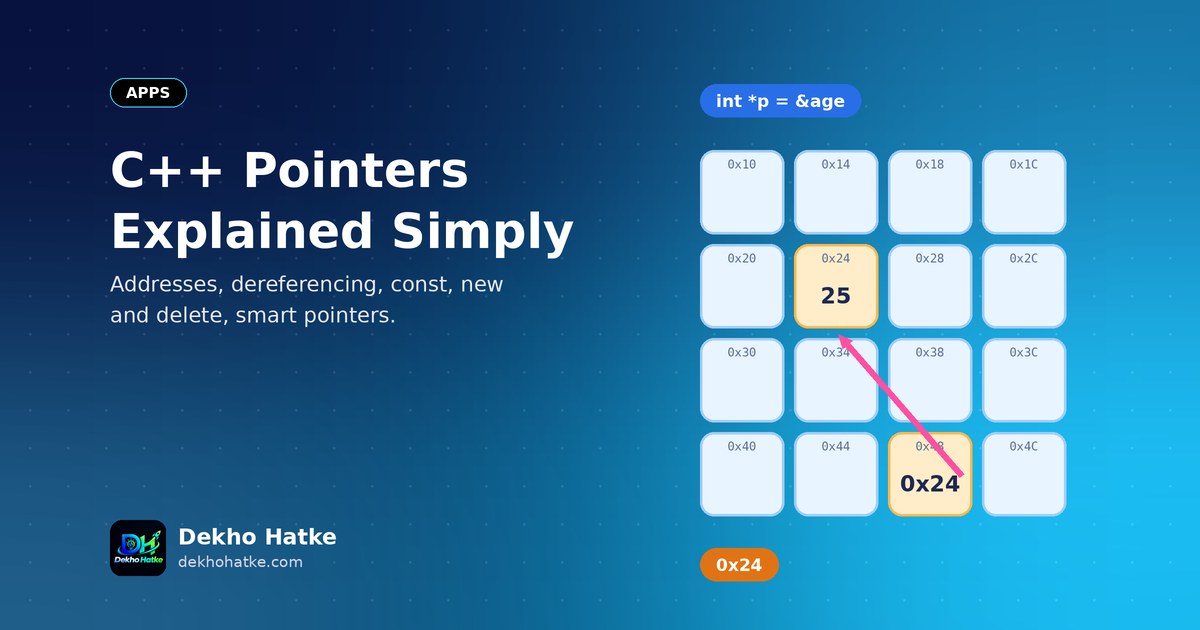
Pointers have a frightening reputation. Students hear that they cause crashes, that they are hard to read and that other languages removed them for good reason. The truth is simpler: a pointer is just a variable that stores a memory address. Once you can picture memory as a long street of numbered houses, pointers stop being mysterious. This tutorial builds that picture step by step and then uses it to explain declaring pointers, dereferencing, nullptr, arrays, const, functions, dynamic memory and smart pointers. Every code example is short enough to type and run yourself.
Memory is a street of numbered houses
When your program runs, its variables live in the computer's memory. Imagine memory as a very long street. Every house has an address (a number), and a house can hold one value. When you write:
int age = 25;the compiler reserves a few houses (an int usually needs four bytes), stores the number 25 in them and remembers the address of the first house under the name age. You normally never see that address, because you use the name. A pointer lets you work with the address directly.
You can print the address with the address-of operator &:
#include <iostream>

int main() {
    int age = 25;
    std::cout << "value:   " << age << "\n";
    std::cout << "address: " << &age << "\n";
}
The output shows 25 and a hexadecimal number like 0x7ffee3b2a9ac. The address changes from run to run, because the operating system decides where to place your program in memory. Do not rely on a specific number.
What a pointer is
A pointer is a variable whose value is an address. You declare it with a * after the type it points to:
int age = 25;
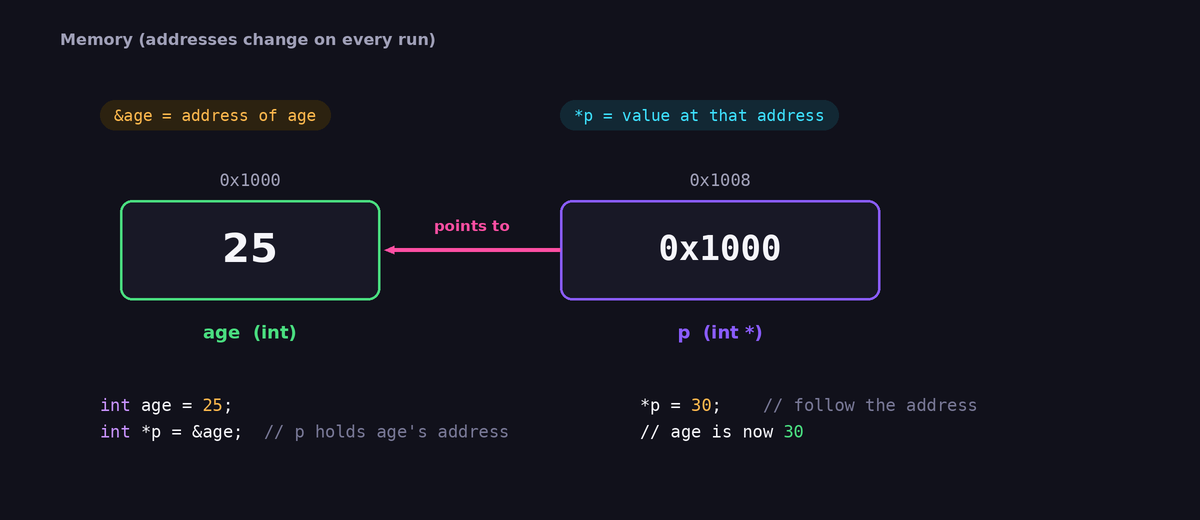
int *p = &age;     // p stores the address of age
Read the second line from right to left: &age is the address of age, and p is a "pointer to int" that holds this address. Now two names lead to the same house: age is the house's own name, and p holds its address. The type matters: an int* can point only to an int, a double* only to a double. The type tells the compiler how many bytes to read and how to interpret them.
A note on style: you will see int *p, int* p and int * p. All are identical to the compiler. Be careful when you declare several pointers on one line, because int* a, b; declares one pointer a and one plain int named b. Write one declaration per line to avoid confusion.
Dereferencing: following the address
The * symbol has a second meaning when it appears in an expression and not in a declaration. It is the dereference operator, and it means "go to the address and use the value that lives there":
int age = 25;
int *p = &age;

std::cout << *p << "\n";   // prints 25: read through the pointer
*p = 30;                   // write through the pointer
std::cout << age << "\n";  // prints 30: age changed
That single idea, reading and writing another variable through its address, is the entire purpose of pointers. Keep these two meanings of * apart: in a declaration it makes a pointer type, in an expression it follows a pointer. And & in an expression means "give me the address", which is different from the & in a reference declaration that we will meet soon.
Null pointers: pointing at nothing
A pointer that does not point to anything valid should hold the special value nullptr:
int *p = nullptr;

if (p == nullptr) {
    std::cout << "p points to nothing\n";
}
Dereferencing a null pointer is a bug that usually crashes the program, so check a pointer before you use it if it might be null. Always give a pointer a value when you declare it. An uninitialised pointer contains a random address, and using it is even worse than null, because the program may not crash at once but silently damage other data. Modern C++ uses nullptr. The older forms NULL and 0 still compile, but they can confuse overload resolution, so prefer nullptr.
Pointers and arrays
An array is a row of houses side by side. The name of an array can be used as a pointer to its first element:
int marks[3] = {70, 85, 90};
int *p = marks;            // same as &marks[0]

std::cout << *p << "\n";       // 70
std::cout << *(p + 1) << "\n"; // 85
std::cout << p[2] << "\n";     // 90
The expression p + 1 does not add one byte. It moves by one element, which means four bytes for an int pointer. This is called pointer arithmetic, and the compiler does the multiplication for you. The notation p[2] is just a shorter way of writing *(p + 2). You can loop with a pointer, too:
for (int *q = marks; q != marks + 3; ++q) {
    std::cout << *q << " ";
}
Keep the pointer inside the array. Moving beyond the last element and dereferencing is undefined behaviour. In modern code, prefer std::vector and std::array, which know their own size and offer safe access with .at().
Pointers and functions
By default, C++ passes arguments by value: the function receives a copy, and changes do not affect the original. This function does nothing useful:
void addTen(int x) {
    x += 10;        // changes only the copy
}
With a pointer, the function receives the address, so it can change the original:
void addTen(int *x) {
    if (x != nullptr) {
        *x += 10;
    }
}

int main() {
    int n = 5;
    addTen(&n);
    std::cout << n << "\n";   // 15
}
C++ also offers references, which achieve the same with simpler syntax:
void addTen(int &x) {
    x += 10;
}

int main() {
    int n = 5;
    addTen(n);               // no & needed at the call
    std::cout << n << "\n";  // 15
}
Which should you choose? A reference must refer to an existing object, cannot be null and cannot be re-pointed to something else after it is created. That makes references safer and cleaner for ordinary "give the function access to this object" cases. Use a pointer when the argument may legitimately be absent (nullptr), when you need to point at different objects over time, or when you work with arrays, dynamic memory and data structures such as linked lists. A useful default: use a reference parameter, and use a pointer when "no object" is a valid answer.
const and pointers
The word const can appear in different places, and each place means something different. Read the declaration from right to left:
int a = 1, b = 2;

const int *p1 = &a;       // pointer to a constant int: cannot change *p1, can re-point p1
int *const p2 = &a;       // constant pointer to int: can change *p2, cannot re-point p2
const int *const p3 = &a; // neither can change
In practice, the first form is the one you will use most: a function parameter like const char *text or const int *data promises that the function will not modify what the pointer refers to. It documents your intention and lets the compiler catch mistakes.
Dynamic memory with new and delete
Local variables disappear when their function ends. Sometimes you need memory that lives longer, or whose size you only know while the program runs. That memory comes from the heap, and you request it with new:
int *p = new int(42);          // one int on the heap, value 42
std::cout << *p << "\n";
delete p;                      // give the memory back
p = nullptr;                   // avoid a dangling pointer

int *arr = new int[5];         // array of five ints
for (int i = 0; i < 5; i++) arr[i] = i * i;
delete[] arr;                  // arrays need delete[]
Every new must have exactly one matching delete. If you forget it, the program has a memory leak: it keeps asking for memory and never returns it. If you delete twice, you get a double free crash. If you use the pointer after the delete, you have a dangling pointer. And memory from new[] must be released with delete[], not plain delete. These rules are easy to break in larger programs, which is why modern C++ avoids manual new and delete in everyday code.
Smart pointers: let the compiler clean up
Since C++11, the standard library provides smart pointers in the <memory> header. They are objects that behave like pointers but delete the memory automatically when it is no longer needed.
#include <iostream>
#include <memory>
#include <string>
#include <utility>

struct Player {
    std::string name;
    Player(std::string n) : name(std::move(n)) { std::cout << name << " created\n"; }
    ~Player() { std::cout << name << " destroyed\n"; }
};

int main() {
    auto a = std::make_unique<Player>("Asha");   // sole owner
    std::cout << a->name << "\n";

    auto b = std::make_shared<Player>("Ravi");   // shared ownership
    auto c = b;                                  // two owners now
    std::cout << b.use_count() << "\n";          // 2
}   // both objects are destroyed automatically here
Three types cover almost every case:
std::unique_ptrhas exactly one owner. It cannot be copied, only moved. It is the default choice and has no overhead compared with a raw pointer.std::shared_ptrallows several owners and deletes the object when the last owner disappears. Use it when ownership really is shared.std::weak_ptrobserves ashared_ptrwithout owning it. It is used to break reference cycles, which would otherwise leak memory.
Create them with std::make_unique and std::make_shared. The arrow operator -> accesses a member through a pointer: a->name is a shorter form of (*a).name. A good rule for modern code: use plain values and references first, std::unique_ptr when you need heap allocation, and raw pointers only as non-owning observers.
Pointers to structures and objects
Pointers become really useful with structures and classes, for example in linked lists and trees:
struct Node {
    int value;
    Node *next;
};

int main() {
    Node c{3, nullptr};
    Node b{2, &c};
    Node a{1, &b};

    for (Node *cur = &a; cur != nullptr; cur = cur->next) {
        std::cout << cur->value << " ";
    }
}
The output is 1 2 3. Each node holds the address of the next one, and nullptr marks the end of the list. This loop shows the typical pointer pattern: start at the first node, follow next and stop at nullptr. In a real program you would allocate the nodes dynamically, preferably with smart pointers, or use std::list.
The most common pointer mistakes
- Using an uninitialised pointer. Always initialise with an address or
nullptr. - Dereferencing
nullptr. Check before you use a pointer that might be null. - Returning the address of a local variable. The variable is gone when the function returns.
- Forgetting to free memory, or freeing it twice. Prefer smart pointers.
- Going past the end of an array. Check indexes, or use
std::vector. - Mixing
new[]withdelete. The pair isnew[]anddelete[]. - Comparing or copying pointers when you meant values.
p1 == p2compares addresses, not the numbers they point to.
When one of these causes a crash, our article on finding a segmentation fault with AddressSanitizer and gdb shows you how to locate the exact line.
Practice exercises
Try these on your own before you look at the hints.
- Write a function
swap(int *a, int *b)that exchanges two integers. Hint: use a temporary variable and dereference both pointers. - Write a function that receives an
intarray and its size, and returns the largest value using only pointer notation. - Create a singly linked list of five numbers and print it in reverse order. Hint: use recursion or store the nodes first.
- Rewrite exercise 1 with references instead of pointers and compare how the calls look.
- Make a
std::unique_ptr<int[]>of ten elements, fill it with squares and print the sum.
Frequently asked questions
Why do we need pointers at all in modern C++?
You need them for dynamic memory, polymorphism, data structures with links, interfacing with C libraries and optional objects. But modern C++ hides most raw pointers behind smart pointers, containers and references, so you will write fewer of them than older books suggest.
What is the difference between a pointer and a reference?
A reference is another name for an existing object, must be initialised, cannot be null and cannot be changed to refer to something else. A pointer is an object that holds an address, can be null and can be re-assigned. Use references when you can and pointers when you must.
What is a dangling pointer?
It is a pointer that still holds an address, but the object at that address no longer exists, for example after delete or when a function returned the address of a local variable. Using it is undefined behaviour.
Why does sizeof(p) not give the array size?
sizeof of a pointer gives the size of the pointer itself, typically 8 bytes on a 64-bit system, and not the size of what it points to. Only an actual array variable reports its full size. That is another reason to use std::vector or std::array.
Are pointers slow?
No. A pointer is just a number. Following one costs almost nothing, although scattered memory can be slower than a contiguous array because of how processor caches work.
Final thoughts
A pointer is an address, & gets the address, and * follows it. Everything else, arrays, functions, dynamic memory and smart pointers, builds on these three sentences. Practise with the small examples above, initialise every pointer, prefer references and smart pointers in new code and use tools to find mistakes. Within a few weeks, pointers will feel like an ordinary part of the language instead of a danger zone.