JavaScript Fetch API: A Practical Guide
Learn JavaScript fetch: GET and POST, error handling, timeouts with AbortController, retries and calling your own backend from a static site.
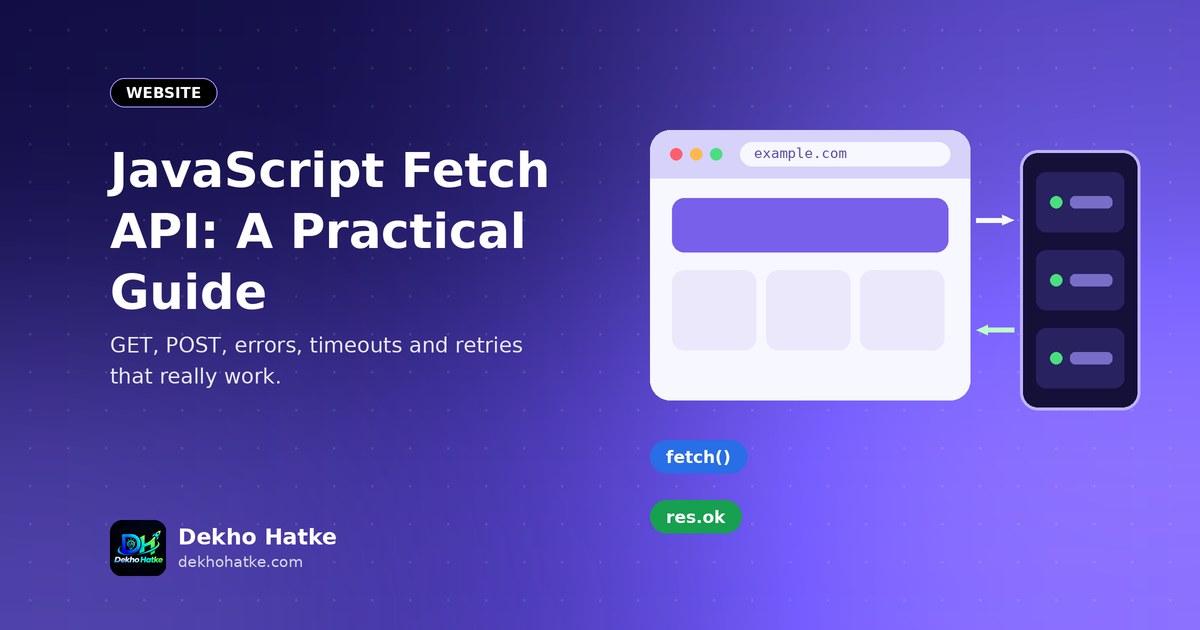
Every modern website talks to a server in the background: it loads a list of products, saves a form, checks a licence or shows the weather. In JavaScript, the built-in tool for this is the Fetch API. It needs no library, it works in every current browser and it is based on promises, so your code stays readable with async and await.
Fetch looks simple, and the first request works in one line. The surprises come later: a 404 response that does not throw an error, a POST that arrives as an empty body, a request that hangs when the server sleeps, a CORS message in the console. This guide walks through everything you need for real projects. You will make GET and POST requests, handle errors correctly, add timeouts, show loading and error states in the page, send several requests in parallel and write a small reusable helper. The examples assume a static website that talks to its own backend, which is a very common setup for small projects.
Your first request
Open the browser console and try this:
const res = await fetch("https://jsonplaceholder.typicode.com/todos/1");
const data = await res.json();
console.log(data);
fetch returns a promise that resolves to a Response object as soon as the server has sent the headers. Reading the body is a second asynchronous step, which is why you also await res.json(). The object printed in the console has fields such as userId, id, title and completed. In a normal script file, wrap the code in an async function, because await works only inside functions that are marked async (modules and the console allow it at the top level):
async function loadTodo() {
  const res = await fetch("https://jsonplaceholder.typicode.com/todos/1");
  const todo = await res.json();
  return todo;
}

loadTodo().then(console.log);
The Response object
The response contains more than the body. These properties are the ones you will use daily:
res.okistruefor status codes 200 to 299.res.statusis the number, such as 200, 404 or 500.res.statusTextis a short text such as "Not Found".res.headers.get("content-type")reads a response header.res.json(),res.text(),res.blob()andres.formData()read the body in different formats.
You can read the body only once. If you call res.json() and later res.text() on the same response, the second call fails. Use res.clone() when you need two reads.
The most important gotcha: fetch does not fail on HTTP errors
Beginners write this and believe they handle errors:
try {
  const res = await fetch("/api/missing");
  const data = await res.json();      // may throw, or give an error object
} catch (err) {
  console.log("Something went wrong");
}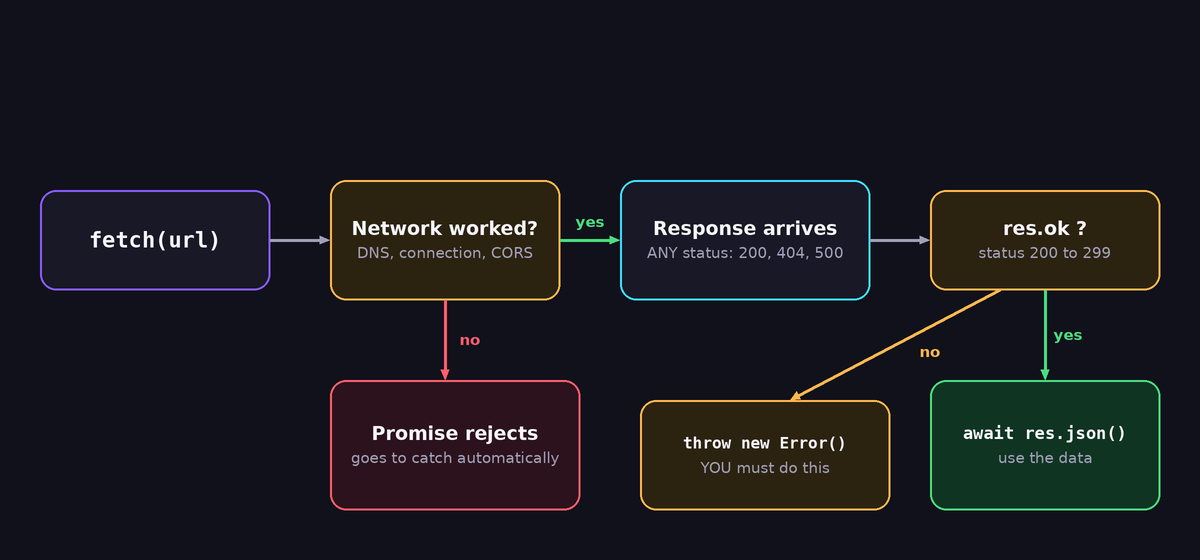
The catch block runs only when the network fails: no internet, a DNS error, a blocked request or a CORS rejection. A response with status 404 or 500 is a successful HTTP exchange from the point of view of fetch, so the promise resolves normally. You must check res.ok yourself:
async function getJson(url) {
  const res = await fetch(url);
  if (!res.ok) {
    throw new Error("Server answered " + res.status + " " + res.statusText);
  }
  return res.json();
}
With this small function, both kinds of failure end up in the same catch, and the rest of your code can stay simple.
Sending data with POST
To send JSON, set the method, the content type header and a string body:
async function saveNote(note) {
  const res = await fetch("/api/notes", {
    method: "POST",
    headers: { "Content-Type": "application/json" },
    body: JSON.stringify(note),
  });
  if (!res.ok) throw new Error("Could not save: " + res.status);
  return res.json();
}

saveNote({ title: "Buy milk", done: false }).then(console.log);
Two mistakes cause most "my POST arrives empty" problems. The first is forgetting JSON.stringify: passing a plain object as body sends the text [object Object]. The second is forgetting the Content-Type header, so that the server does not parse the body as JSON. On a Flask backend, request.get_json() returns None when the header is missing.
Sending form data
For file uploads or classic form fields use FormData. Do not set the content type yourself, because the browser must add the boundary information:
const form = new FormData();
form.append("name", "Asha");
form.append("photo", fileInput.files[0]);

const res = await fetch("/api/profile", { method: "POST", body: form });
Query strings
Build query strings with URLSearchParams, so special characters are encoded properly:
const params = new URLSearchParams({ q: "chai & biscuit", page: 2 });
const res = await fetch("/api/search?" + params.toString());
Never glue user input into a URL with plain string concatenation. The characters &, # and spaces will break the request or change its meaning.
Headers, methods and credentials
The second argument of fetch is an options object. These options cover most needs:
method:"GET"(default),"POST","PUT","PATCH"or"DELETE".headers: an object, for example{ "Authorization": "Bearer " + token }.body: a string,FormData,BloborURLSearchParams. GET requests cannot have a body.credentials:"same-origin"by default. Use"include"to send cookies to another origin, which also requires matching server headers.cache: for example"no-store"when you must never see an old answer.signal: an abort signal, shown in the next section.
A word of caution about secrets: everything in your front-end JavaScript is visible to every visitor. Never put API keys, passwords or private tokens into a static site's script. If a call needs a secret, make the call from your server and let the page call your server.
Timeouts and cancelling requests
By default, a fetch request waits as long as the browser allows, which can be a minute or more. For a good user experience, set your own limit. Modern browsers support AbortSignal.timeout:
async function getWithTimeout(url, ms = 10000) {
  const res = await fetch(url, { signal: AbortSignal.timeout(ms) });
  if (!res.ok) throw new Error("HTTP " + res.status);
  return res.json();
}
When the time is up, the promise rejects with a TimeoutError. If you need to support older browsers, or you want to cancel a request yourself, for example when the user types a new search term, use an AbortController:
let controller;

async function search(term) {
  if (controller) controller.abort();     // cancel the previous request
  controller = new AbortController();

  try {
    const res = await fetch("/api/search?q=" + encodeURIComponent(term), {
      signal: controller.signal,
    });
    return await res.json();
  } catch (err) {
    if (err.name === "AbortError") return null;   // we cancelled it ourselves
    throw err;
  }
}
Cancelling old requests prevents a classic bug: a slow answer for an old search term arrives after the answer for the new term and overwrites it.
Show loading and error states in the page
Users need feedback. A request without feedback feels like a broken page. This example loads a list and updates the DOM in three states:
<div id="status"></div>
<ul id="list"></ul>
<button id="reload">Reload</button>

<script>
const statusEl = document.getElementById("status");
const listEl = document.getElementById("list");

async function loadPosts() {
  statusEl.textContent = "Loading...";
  listEl.innerHTML = "";
  try {
    const res = await fetch("https://jsonplaceholder.typicode.com/posts?_limit=5",
                            { signal: AbortSignal.timeout(10000) });
    if (!res.ok) throw new Error("HTTP " + res.status);
    const posts = await res.json();

    for (const p of posts) {
      const li = document.createElement("li");
      li.textContent = p.title;          // textContent is safe against HTML injection
      listEl.appendChild(li);
    }
    statusEl.textContent = "";
  } catch (err) {
    statusEl.textContent = "Could not load the posts. Please try again.";
    console.error(err);
  }
}

document.getElementById("reload").addEventListener("click", loadPosts);
loadPosts();
</script>
The comment about textContent matters for security. If you insert server data with innerHTML, a malicious value such as <img src=x onerror=...> could run code in your visitors' browsers. This is called cross-site scripting. Use textContent, or sanitise the data, whenever the text comes from outside.
Several requests at once
Waiting for requests one after another wastes time. If they do not depend on each other, start them together with Promise.all:
const [user, orders] = await Promise.all([
  getJson("/api/user"),
  getJson("/api/orders"),
]);
Promise.all rejects as soon as one request fails. When you want to keep the successful results even if another request fails, use Promise.allSettled, which gives you an array of objects with status set to "fulfilled" or "rejected":
const results = await Promise.allSettled([
  getJson("/api/news"),
  getJson("/api/weather"),
]);

results.forEach((r, i) => {
  if (r.status === "fulfilled") console.log("ok", i, r.value);
  else console.warn("failed", i, r.reason.message);
});
A retry helper for flaky servers
If your backend runs on a free service that sleeps when nobody uses it, the first request after a quiet period can be slow or fail. A small retry with increasing delay hides this from the visitor:
const sleep = (ms) => new Promise((r) => setTimeout(r, ms));

async function fetchRetry(url, options = {}, tries = 3) {
  let lastError;
  for (let i = 0; i < tries; i++) {
    try {
      const res = await fetch(url, { ...options, signal: AbortSignal.timeout(20000) });
      if (res.status >= 500) throw new Error("HTTP " + res.status);
      return res;
    } catch (err) {
      lastError = err;
      await sleep(1000 * 2 ** i);        // 1s, 2s, 4s
    }
  }
  throw lastError;
}
Retry only requests that are safe to repeat. Retrying a payment or a "send message" request might duplicate the action if the first attempt actually reached the server. Server-side counterparts of these ideas are described in our guide to timeouts and retries in Python requests.
Talking to your own backend
For a static site with a separate backend, keep the address of the backend in one configuration value instead of repeating it in every call:
const API = "https://api.example.com";

async function api(path, options = {}) {
  const res = await fetch(API + path, {
    headers: { "Content-Type": "application/json" },
    ...options,
  });
  if (!res.ok) throw new Error("API error " + res.status);
  return res.json();
}

const items = await api("/items");
When the page and the API have different origins, the browser applies the CORS rules, and you will see the "blocked by CORS policy" message unless the server sends the right headers. We explain the cause and the Flask fix in this article about the CORS error with a Flask API. If the backend is a free web service that fails to start, read the Render "No open ports detected" guide.
Debugging with the Network tab
When a request misbehaves, do not guess. Open the browser developer tools and click Network. Reload the page and click the request. Check these four things in order: the URL and method, the status code, the request headers and body (the Payload tab) and the response (the Response or Preview tab). Most problems are visible there: a wrong address, a missing header, an empty body or an HTML error page where you expected JSON. If you see a request without a response, look at the console for a CORS or network error.
Frequently asked questions
Fetch or Axios?
Fetch is built in and enough for most projects. Axios adds conveniences such as automatic JSON conversion, interceptors and errors for non-2xx statuses, at the cost of an extra dependency. With the small helper functions in this article, fetch covers the same ground.
Why does res.json() throw "Unexpected token <"?
The server returned HTML, usually an error page or a login page, instead of JSON. Check res.status and print await res.text() to see what really arrived.
Does fetch work in older browsers?
Fetch is supported by all current browsers. Internet Explorer never supported it. AbortSignal.timeout is newer than fetch itself, so use AbortController with setTimeout if you must support older versions.
Can I use fetch in Node.js?
Yes. Recent versions of Node.js include a global fetch, with the same basic behaviour.
How do I send cookies with a cross-origin request?
Set credentials: "include", and make the server answer with Access-Control-Allow-Credentials: true and an exact allowed origin. A wildcard origin is not accepted in that case.
Final thoughts
Fetch is easy to start and easy to misuse. Remember the habits that make it reliable: check res.ok, stringify your JSON and set the content type, give every request a timeout, show the user what is happening and never trust data from outside when you write it into the page. Wrap those habits in two or three small helper functions, and every request in your project will behave the same predictable way.